
Overview
You can find this option under the following menu options. Customs
Brokerage -> ABI Menu -> ACH & Statement Menu -> PSC ACH Additional Duty/Taxes/Fees
Xmit
Payments are transmitted using the CBP PN record application
from the CATAIR. The CBP response is returned using the PZ response.
Screen Layout
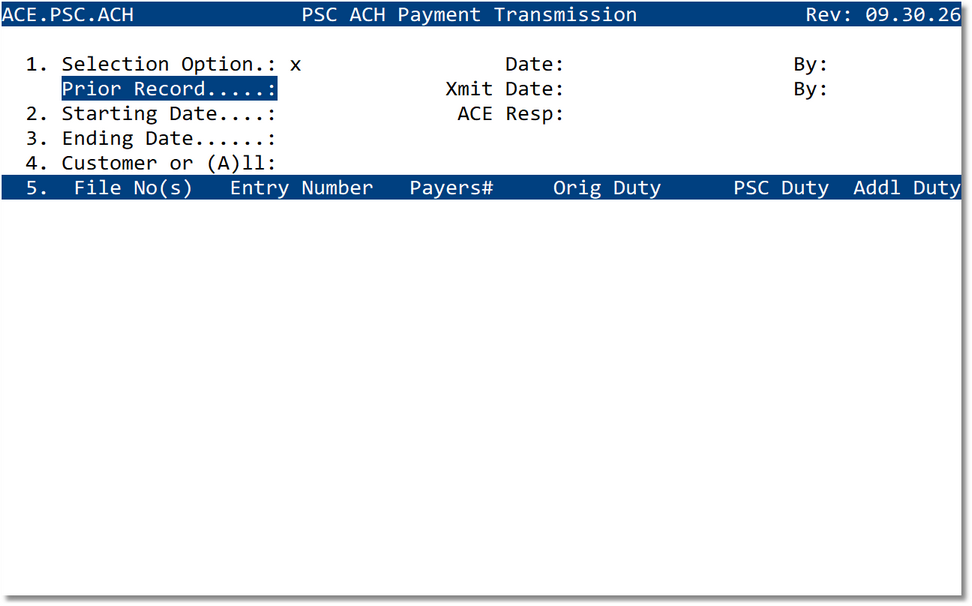
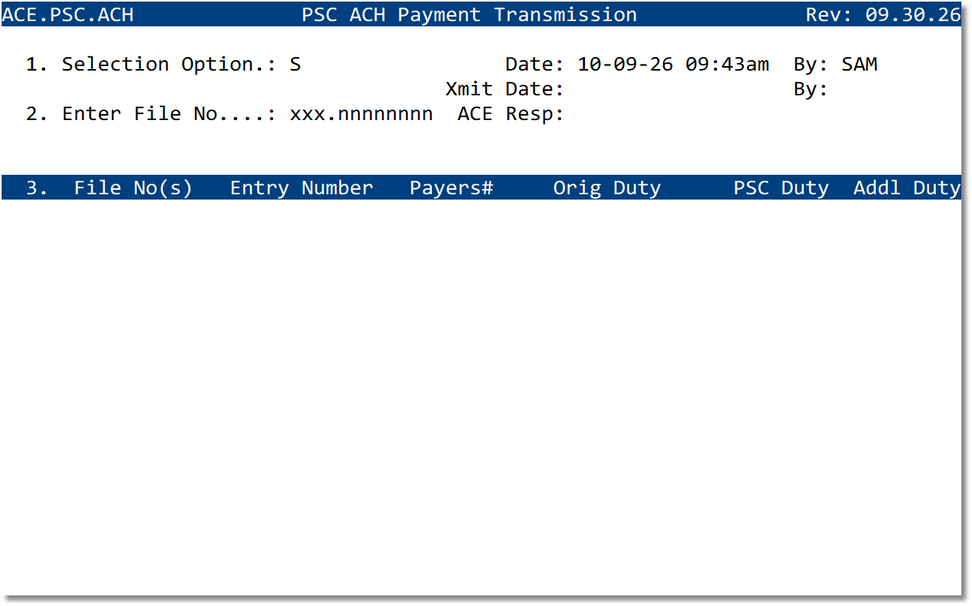
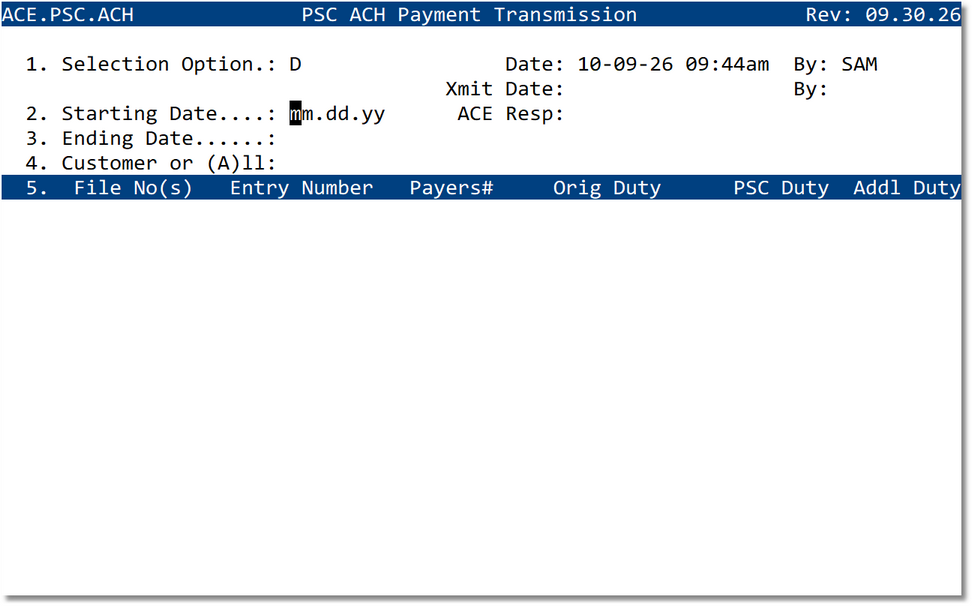
Selection Options
Enter the appropriate option in Selection Option to control how the PSC ACH payment record is built.
S
Specific Files
Add entries by entering specific ATS file numbers.
Specific Files
Add entries by entering specific ATS file numbers.
D
Date Range
Add entries by starting date, ending date, and optional customer filter.
Date Range
Add entries by starting date, ending date, and optional customer filter.
P
Prior Record
Pull up a prior entered PSC ACH payment record.
Prior Record
Pull up a prior entered PSC ACH payment record.
T
Transmit
Transmit the selected entries for ACH payment through ACE.
Transmit
Transmit the selected entries for ACH payment through ACE.
Add by Specific Files
- Enter S in Selection Option.
- Enter the ATS file number in Enter File No..
- Repeat for each file that must be included in the payment transmission.
- Review the selected files in the grid before transmitting.
Add by Date Range / Customer
- Enter D in Selection Option.
- Enter the Starting Date using the displayed date format.
- Enter the Ending Date.
- Enter a customer code in Customer or (A)ll, or enter A to include all applicable customers.
- Review the entries returned in the grid before transmitting.
Use the customer prompt to limit the payment list to a single customer. Use
A only when the transmission should include all eligible records for the selected date
range.
Prior Record
Use P to pull up a prior entered PSC ACH payment record. After the prior record is loaded, verify the displayed entries and transmission status before taking any additional action.
Transmit for Payment
Once all required files have been selected or entered, press T to transmit the entries for payment.
- The transmission is created using the CBP PN record application.
- The ACE response is returned using the PZ response.
- The screen displays transmission tracking information in the Xmit Date and ACE Resp fields.
- Review the response before considering the payment transmission complete.
Field Reference
| Field | Description |
|---|---|
| Selection Option | Determines whether the user will add by specific files, add by date range/customer, pull up a prior record, or transmit selected entries. |
| Prior Record | Used with Option P to retrieve a previously entered PSC ACH payment record. |
| Enter File No. | Used with Option S to add entries by specific ATS file number. |
| Starting Date | Beginning date used with Option D when selecting records by date range. |
| Ending Date | Ending date used with Option D when selecting records by date range. |
| Customer or (A)ll | Customer filter used with Option D. Enter a customer code or enter A to include all customers. |
| Date / By | Shows the date/time and user associated with the payment record activity. |
| Xmit Date / By | Shows the date/time and user associated with the ACH payment transmission. |
| ACE Resp | Displays the ACE response status returned after transmission. |
| File No(s) | ATS file numbers selected for PSC ACH payment. |
| Entry Number | Entry number associated with the selected PSC file. |
| Payers# | ACH payer number associated with the payment. |
| Orig Duty | Original duty amount for the entry. |
| PSC Duty | Duty amount after the Post Summary Correction. |
| Addl Duty | Additional duty amount to be paid by ACH. |